Home Security Cameras: What Features Matter
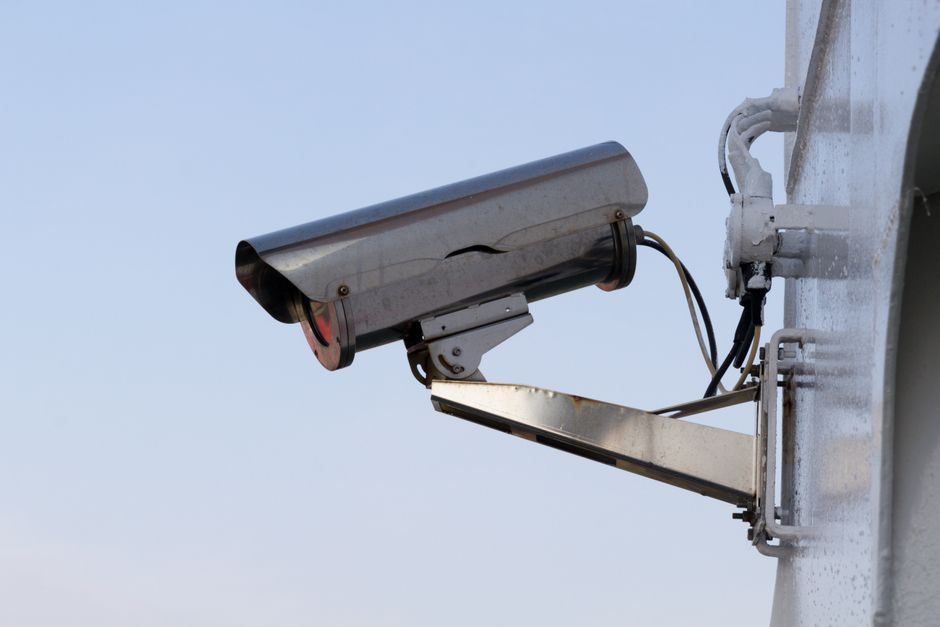
Choosing a home security camera involves evaluating several technical aspects that influence how effectively it can monitor your property. The market offers a wide range of models, each with different specifications and capabilities. Understanding the core features helps in making an informed decision that aligns with your specific security needs and preferences. This article explores the essential elements to consider, focusing on resolution, storage, night vision, and other critical functionalities.
Security cameras serve as both a deterrent and a means of documentation. The right features can provide clear evidence in the event of an incident, allow for remote monitoring, and integrate with other smart home devices. However, not all features are equally important for every household. Factors such as the size of the property, the areas to be monitored, and the level of detail required in footage will influence which specifications are most relevant. By examining each feature in detail, you can better understand what to look for when comparing different models.
The Role of Resolution and Image Quality
Resolution is a fundamental specification that determines the clarity and detail of the video captured. Higher resolution cameras, such as those offering 1080p or 4K, provide sharper images, making it easier to identify faces, license plates, or other important details. However, higher resolution also requires more bandwidth and storage space, which can be a consideration depending on your internet connection and data plan. It is important to balance the need for clarity with the practical constraints of your network and storage capacity.
In addition to resolution, other factors like sensor size and lens quality affect image quality, especially in varying lighting conditions. Cameras with larger sensors generally perform better in low light, producing less noise and more usable footage. Look for specifications such as the aperture size and the camera’s ability to handle high dynamic range (HDR), which helps preserve details in scenes with both bright and dark areas. These elements combine to determine the overall effectiveness of the camera in real-world situations.
Understanding Frame Rate and Field of View
Frame rate, measured in frames per second (fps), affects the smoothness of the video. A standard frame rate of 15 to 30 fps is typically sufficient for most security purposes, but higher frame rates like 60 fps can capture fast-moving objects more clearly. For areas with high traffic, a higher frame rate may be beneficial. However, higher fps also increases file sizes and storage requirements.
The field of view (FOV) determines how much area the camera can cover. A wider angle, such as 120 degrees or more, allows you to monitor a larger space with a single camera, reducing the number of cameras needed. However, wide-angle lenses can introduce distortion at the edges, making objects appear further away or distorted. Some cameras offer adjustable lenses or pan/tilt features to help customize the view. Consider the layout of your property and the specific areas you need to monitor when evaluating the field of view.
Storage Options: Local vs. Cloud
Storage is a critical component of any security camera system, as it determines how much footage is retained and accessible. There are two primary storage options: local storage and cloud storage. Local storage involves saving video directly to a device on your premises, such as a microSD card or a networked video recorder (NVR). This method offers data privacy and control, but is vulnerable to theft or damage if the device is compromised. Cloud storage, on the other hand, uploads footage to a remote server, ensuring data is safe even if the camera is destroyed. It also allows for convenient access from anywhere via a mobile app or web portal.
Many cameras offer hybrid solutions, allowing you to utilize both local and cloud storage. When choosing, consider the cost of cloud subscriptions, the ease of accessing footage, and the security of your data. Some cloud services provide free tier with limited storage, while others require a monthly fee. Evaluate your willingness to manage local hardware and your need for remote access when deciding which storage method is right for you.
The Importance of Night Vision
Night vision capabilities are essential for security cameras, as many incidents occur in low-light conditions. Traditional night vision uses infrared (IR) LEDs to illuminate the area, recording in black and white. Modern cameras may use color night vision, which relies on sensitive sensors and ambient light to produce color images even at night. This can be useful for identifying details like clothing color or car paint. Check the camera’s night vision range to ensure it covers the critical areas of your property, especially if you have a large yard or driveway.
Some cameras also include a spotlight or a bright light that illuminates the area upon motion detection, providing color footage and acting as a deterrent. This feature can be beneficial in preventing intrusions, but keep in mind that it uses more energy and may alert neighbors. Consider the trade-off between continuous IR night vision and event-based spotlights when selecting a camera.
Motion Detection and Alerts
Motion detection is a fundamental feature that triggers recording and notifications when activity is detected. Basic motion detectors work by analyzing changes in pixels or infrared radiation, but they can be triggered by pets, passing cars, or moving branches, leading to false alerts. Advanced cameras use human detection or intrusion detection, which relies on algorithms to distinguish between humans and other objects. This reduces unnecessary notifications and improves the reliability of the system.
Look for cameras that offer customization options, such as setting specific detection zones or adjusting sensitivity levels. Some models allow you to define areas where motion should be ignored, like a busy street, while prioritizing activity near entrances. Push notifications can be sent to your smartphone or email, allowing you to stay informed of events in real time. Consider how you would like to receive alerts and whether you prefer to have the system automatically record when motion is detected.
Audio Capabilities and Two-Way Talk
Two-way audio enables you to listen and speak through the camera, which can be useful for remote intercom features or to deter intruders. Many modern cameras come with built-in speakers and microphones, allowing you to communicate with visitors or delivery personnel. Audio also provides additional context to video footage, helping to understand the situation more clearly. Some cameras support continuous audio recording, while others only activate audio when recording is triggered.
When evaluating audio features, consider the quality of the microphone and speaker, and whether the camera supports noise reduction to minimize wind or background noise. Some jurisdictions have laws regarding audio surveillance, so it is important to be aware of legal considerations in your region. If two-way communication is a priority, ensure that the camera’s app supports smooth and low-latency voice transmission.
Smart Home Integration and Connectivity
Integration with smart home ecosystems can enhance the functionality of your security cameras. Many cameras work with platforms like Amazon Alexa, Google Assistant, or Apple HomeKit, allowing you to view live feeds on smart displays or receive alerts through voice commands. They can also integrate with other smart devices, such as smart locks or lighting, to create automated routines—for example, having a camera trigger a floodlight when motion is detected. Check compatibility with your existing smart home system before making a purchase.
Connectivity is another important factor. Most modern cameras support Wi-Fi, but some offer Ethernet connections for a more stable and reliable connection. If your network has poor coverage in the area where the camera will be installed, consider a model with a strong wireless antenna or one that supports PoE (Power over Ethernet) for both data and power over a single cable. A stable connection is essential for continuous monitoring and remote access.
Privacy and Security Considerations
When installing security cameras, it is crucial to address privacy and security concerns. This includes ensuring that your camera system is secure from hacking attempts, which can compromise your personal data and footage. Use cameras from reputable manufacturers that provide regular firmware updates to patch vulnerabilities. Set strong, unique passwords for your cameras and Wi-Fi network, and enable two-factor authentication where possible. Additionally, consider which areas are being recorded; be mindful of neighbors’ privacy and avoid pointing cameras at public spaces or other people’s property.
Data storage practices also affect privacy. If you use cloud storage, review the service provider’s data protection policies and encryption methods. Some cameras offer end-to-end encryption for video streams, ensuring that only you can access the footage. Local storage can be more private, but it requires physical security of the storage device. It is important to understand these aspects and take proactive steps to safeguard your system.
Selecting the right home security camera involves balancing technical features with practical considerations. By focusing on resolution, storage, night vision, motion detection, and connectivity, you can find a camera that suits your needs and provides reliable monitoring.
In conclusion, the process of selecting a home security camera is a matter of evaluating your unique requirements against the range of available features. Whether you prioritize high-resolution imagery, advanced motion detection, or smart home compatibility, it is essential to base your decision on the specific context of your property and lifestyle. Remember that no camera can guarantee security on its own; it is part of a broader approach to home safety that includes other measures. Taking the time to research and compare models will help you make an informed choice that aligns with your expectations and budget.